
Nobody Planned This Stack: How Reliability Really Gets Built in Production Systems
Retries, idempotency, DLQs, reconciliation, and why every team ends up with the same design.
Introduction: Reliability Is a Non-Functional Requirement
When we design a system, we write two kinds of requirements.
Functional requirements say what the system does:
"A user can top up their balance."
"A user can buy a data package."
Non-functional requirements say how well the system does it:
Performance: how fast is it?
Scalability: can it handle 10x traffic?
Availability: is it up when users need it?
Security: is it safe from attackers?
Reliability: does it do the right thing, even when things go wrong?
Reliability is the quiet one. Nobody puts it on a feature list, and users never say "thank you for the reliable system". But they notice right away when it is missing: they paid, and the package never activated.
Reliability is not "nothing ever fails". That is impossible. Reliability means: when something fails, the system still ends in a correct state.
This article builds that idea from zero. We will look at one simple problem, and see how it forces us, step by step, into the same four layers that almost every production team ends up with.
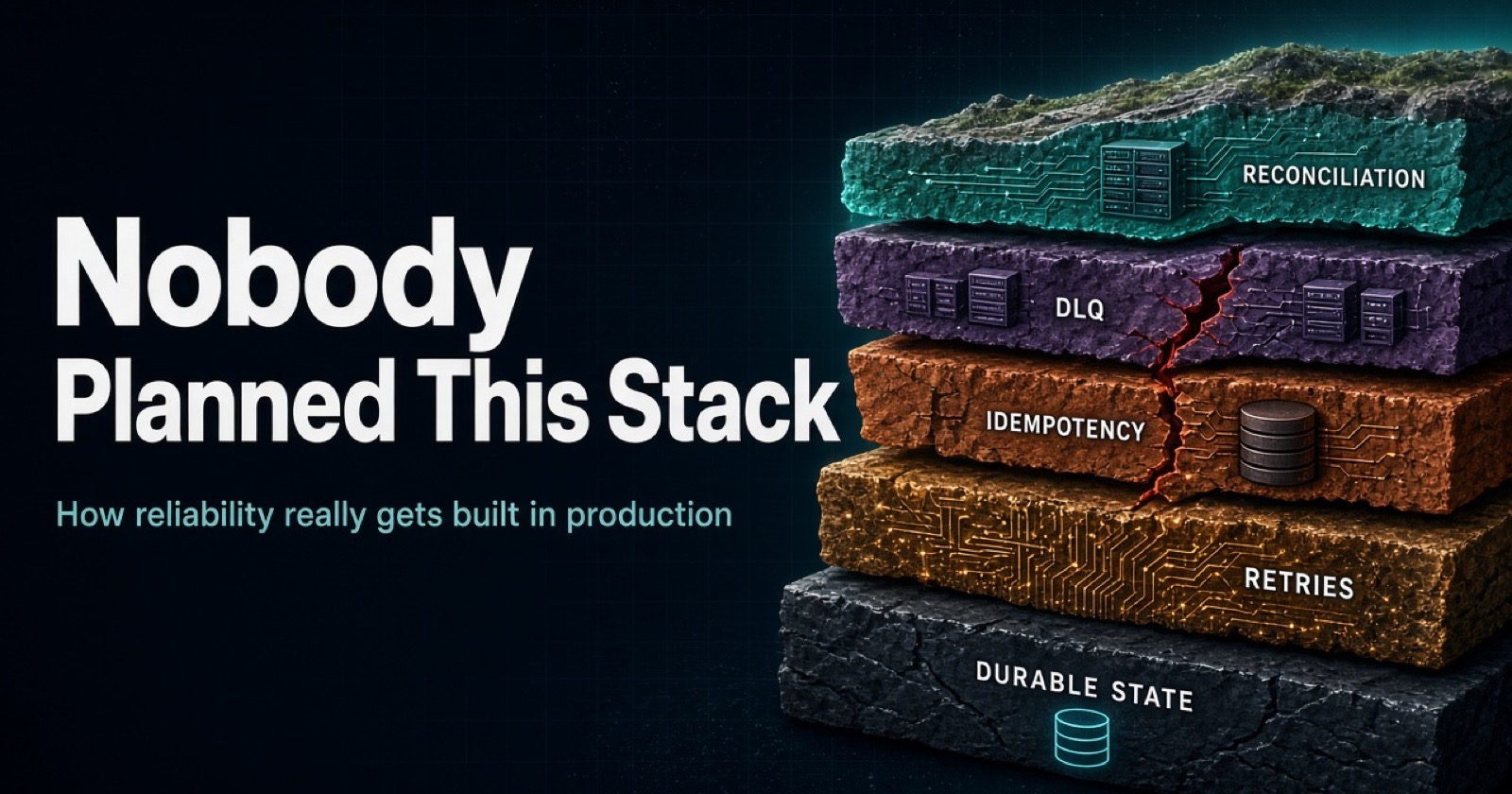
I found this topic through a LinkedIn post. The author asked hundreds of engineers how they handle workflows that fail in the middle. Most teams were doing something similar, in the same order, and nobody had planned it. The picture that came with the post shows it well: layers of soil, piling up over time.
reconciliation   <- newest layer (top)
DLQ
idempotency
retries          <- oldest layer (bottom)
Each layer was added after something broke in production. Let's understand why.
1. Start From Zero: What Is a Workflow?
A workflow is a job with many steps, where each step can fail.
Example: a user buys a mobile data package.
Reserve the balance
Charge the card
Activate the package in the charging system
Send an SMS
Write an audit log
If all steps live inside one database, life is easy. You use one transaction: everything succeeds, or everything rolls back.
But real systems call other systems: a payment provider, a charging system, an SMS gateway. You cannot put them inside one transaction. Each step becomes a separate call over a network.
The core problem: what if the workflow dies in the middle? The card was charged (step 2), but the package was not activated (step 3).
This is called a partial failure. Everything in this article is about handling it.
2. Three Facts You Cannot Escape
Fact 1: Things fail all the time
Servers crash. Networks drop packets. Deployments restart pods. Timeouts happen. At scale, a "rare" failure happens every day.
Fact 2: After a timeout, you cannot know if the call worked
You send "charge $10". No answer comes back. There are two possibilities:
The charge did not happen.
The charge happened, but the reply got lost.
You cannot tell which one. This is the heart of distributed systems.
Fact 3: When unsure, you have two choices
Do nothing: you may lose work (at-most-once).
Try again: you may do the work twice (at-least-once).
Most systems choose to try again, because losing a payment or an order is worse. But now you must make "twice" safe.
That single decision creates the four layers.
3. The Mental Model: A Chain of Problems
Each solution creates the next problem:
Call failed             ->  RETRIES
Retry ran it twice      ->  IDEMPOTENCY
Some jobs never work    ->  DEAD LETTER QUEUE (DLQ)
Some failures are silent ->  RECONCILIATION
Keep this chain in your head. It is the whole article in four lines.
4. Layer 1: Retries
Problem: a call failed, maybe from a short network problem.
Solution: try again.
But do it carefully:
Exponential backoff: wait 1s, 2s, 4s, 8s...
Jitter: add random time, so all clients do not retry at the same moment.
Maximum attempts: never retry forever.
Retry only errors that can heal: a timeout or
503is worth retrying. A400 Bad Requestwill never work, so do not retry it.
async function withRetry(fn, { max = 5, baseMs = 200 } = {}) {
  for (let attempt = 1; attempt <= max; attempt++) {
    try {
      return await fn();
    } catch (err) {
      if (!isRetryable(err) || attempt === max) throw err;
      const backoff = baseMs * 2 ** attempt;
      const wait = Math.random() * backoff; // jitter
      await new Promise((r) => setTimeout(r, wait));
    }
  }
}
Watch out for retry storms. If a service is struggling and 1,000 clients retry fast, you make the outage worse. Backoff, jitter, and circuit breakers protect you.
New problem: a retry can run the same action twice.
5. Layer 2: Idempotency
Idempotent means: doing the same action many times gives the same result as doing it once.
Problem: the retry may charge the user twice.
Solution: give every action a unique idempotency key. The receiver remembers the key. If it sees the key again, it returns the old result and does not run the action again.
async function charge(req) {
  const key = req.headers['idempotency-key'];

  // A unique constraint makes this safe even with concurrent requests
  const inserted = await db.query(
    `INSERT INTO idempotency_keys (key, status)
     VALUES ($1, 'in_progress')
     ON CONFLICT (key) DO NOTHING
     RETURNING key`,
    [key]
  );

  if (inserted.rowCount === 0) {
    return await getSavedResult(key); // seen before, return old answer
  }

  const result = await doTheCharge(req.body);
  await saveResult(key, result);
  return result;
}
Rules that matter:
The key must stay the same across retries. If you create a new key on each retry, it does nothing.
Store the key and the response.
Use a unique constraint in the database. Do not do "check, then insert". That has a race condition.
Keys need an expiry policy.
You need idempotency on both sides: in the API you call, and in the consumers of your own messages.
New problem: what if retries never succeed?
6. Layer 3: The Dead Letter Queue (DLQ)
Problem: some work fails forever. The data is bad, there is a bug, or the other system is dead. Infinite retries block the queue and waste resources.
Solution: after N failed attempts, move the message to a separate queue, the DLQ. The main flow keeps moving.
main queue --(fail x5)--> DLQ --> alert --> human fixes --> replay
A DLQ is not a solution. It is a parking lot. If nobody looks at it, it is just a place where data goes to die.
Good DLQ practice:
Save the error reason, attempt count, and trace ID with each message.
Alert when the DLQ grows.
Have a replay tool. Replay is safe because of idempotency.
Give the DLQ an owner.
New problem: some failures never reach the DLQ at all. They are silent.
7. Layer 4: Reconciliation
Retries, idempotency, and the DLQ only help with failures you can see: an error is thrown, a message lands in the DLQ, an alert fires.
Reconciliation is for failures that nobody sees.
Reconciliation is a scheduled job that compares what should have happened with what actually happened, across systems, and fixes the differences.
A solid example
A user buys a $10 data package.
Your service saves
order 102 = PAIDand an outbox row, in one transaction. ✅A relay publishes
ActivatePackageto the queue. ✅A consumer calls the charging system:
POST /activate.The charging system replies
200 OK. The consumer commits the message. ✅
Everything is green. No retry, no DLQ, no alert.
But inside the charging system, the request went into its own internal queue, and its worker failed on it because of a bug. The activation was silently dropped.
Our DB says:            Charging system says:
order 101  ACTIVATED    order 101  active  ✅
order 102  ACTIVATED    (nothing)          ❌
order 103  ACTIVATED    order 103  active  ✅
The user paid and got nothing. No layer below saw it. Reconciliation finds it:
async function reconcile() {
  const rows = await db.query(`
    SELECT id FROM orders
    WHERE status = 'ACTIVATED'
      AND updated_at BETWEEN now() - interval '1 day' AND now() - interval '10 minutes'`);
  // the 10-minute gap avoids flagging orders that are still in progress

  for (const order of rows.rows) {
    const exists = await chargingSystem.hasPackage(order.id);
    if (!exists) {
      await chargingSystem.activate(order.id, { idempotencyKey: order.id }); // safe to repeat
      log.warn('Repaired missing activation', { orderId: order.id });
    }
  }
}
Ways things fail silently
| What happens | Why nobody sees it |
|---|---|
The other system says 200 but drops the work |
It looks like success |
| The consumer catches an error, logs it, and acks the message | The message counts as processed |
| A timeout with an unknown result, and the saga just waits | Silence is not an error |
| A queue message expires before anyone reads it | It just disappears |
| Someone resets a consumer offset or purges a queue | Human error, no error code |
| Someone edits data by hand in one system | Two systems disagree, no event was sent |
| Work was done, but with wrong data or wrong logic | Both sides say "success" |
Two things to remember
It checks the destination, not the journey. Outbox, retries, and DLQ protect the journey of a message. Reconciliation checks the final result.
It only catches what you compare. You write custom business logic for what "correct" means. If your check does not include a field or rule, the job will not see that problem.
What it does after finding a gap
| Situation | Action |
|---|---|
| Safe and clear (a missing activation) | Repair automatically, with an idempotent call |
| Risky or unclear (amounts differ) | Alert a human with details |
| Systems disagree | First decide which system is the source of truth |
When it runs
Scheduled: hourly or nightly, over a time window. Banks do this daily.
Stuck-state checks: every few minutes, on things that should already be finished.
On demand: after an incident or a bad deployment, to measure the damage.
It is also an alarm. If it keeps finding many mismatches, a layer below has a bug. Track the number of mismatches per run.
Do you always need it? No. It depends on the cost of being wrong. For money, balances, packages, and orders: yes. For low-value data that fixes itself, like a "last seen" time: usually not. If both sides live in the same database transaction, they cannot disagree.
8. Where the State Lives: The Database You Already Have
So far we have four layers. But they all need one thing: remembering what happened. Which steps are done? How many attempts? What failed?
Teams that go furthest converge on the same answer:
Workflow state is rows in the database you already run. Workers scan for steps to execute.
Why the database?
| What a workflow system needs | What the database already gives you |
|---|---|
| Durable state that survives crashes | Disk and write-ahead log |
| Atomic updates | Transactions |
| "Never do this twice at the same time" | Locks and unique constraints |
| "What is stuck right now?" | SQL |
| Backups, monitoring, team knowledge | Already in place |
One table, one row per step
CREATE TABLE workflow_steps (
  id            BIGSERIAL PRIMARY KEY,
  workflow_id   UUID NOT NULL,
  workflow_type TEXT NOT NULL,          -- 'CHECKOUT', 'REFUND', ...
  step_name     TEXT NOT NULL,
  status        TEXT NOT NULL DEFAULT 'PENDING', -- PENDING | RUNNING | DONE | FAILED
  attempts      INT  NOT NULL DEFAULT 0,
  next_run_at   TIMESTAMPTZ NOT NULL DEFAULT now(),
  payload       JSONB,
  last_error    TEXT,
  UNIQUE (workflow_id, step_name)       -- idempotency at the step level
);
One workflow has one workflow_id, and one row per step:
workflow_id | step_name        | status
----------- | ---------------- | -------
wf-1        | RESERVE_BALANCE  | DONE
wf-1        | CHARGE_CARD      | DONE
wf-1        | ACTIVATE_PLAN    | PENDING
Notice what this table already contains:
attemptsandnext_run_atare retries.UNIQUE (workflow_id, step_name)is idempotency.status = 'FAILED'is the DLQ.status = 'DONE'is checkpointing (more on this below).
That is why teams keep reinventing it.
Workers claim work with SKIP LOCKED
BEGIN;

SELECT * FROM workflow_steps
WHERE status = 'PENDING' AND next_run_at <= now()
ORDER BY next_run_at
LIMIT 10
FOR UPDATE SKIP LOCKED;

-- mark RUNNING, do the work, mark DONE or schedule a retry
COMMIT;
SKIP LOCKED means: if another worker already locked a row, skip it and take the next one. Many workers run in parallel, without waiting on each other and without taking the same row.
How steps are defined
The worker works like a handler map, chosen by step name. Each step reads everything it needs from its saved payload or the DB, so it can retry alone.
const handlers = {
  RESERVE_BALANCE: async (step) => { /* uses step.payload */ },
  CHARGE_CARD:     async (step) => { /* uses step.payload */ },
  ACTIVATE_PLAN:   async (step) => { /* uses step.payload */ },
};

async function runStep(step) {
  await handlers[step.step_name](step);
}
The order still has to live somewhere. Two common ways:
// A) A flow definition (easy to read and change)
const CHECKOUT_FLOW = ['RESERVE_BALANCE', 'CHARGE_CARD', 'ACTIVATE_PLAN'];

// B) Each handler creates the next step (order is hidden inside handlers)
Whichever you choose, marking a step DONE and creating the next step row must happen in one transaction:
BEGIN;
  UPDATE workflow_steps SET status = 'DONE' WHERE id = $1;
  INSERT INTO workflow_steps (workflow_id, workflow_type, step_name)
    VALUES ($2, 'CHECKOUT', 'ACTIVATE_PLAN');
COMMIT;
If step 3 needs the output of step 2, step 2 must save that output before it is marked DONE.
One table or many?
Start with one table and a workflow_type column. One worker loop and one set of monitoring queries cover everything. Split or partition only when you have a real reason: very different volume, different retention rules, or different ownership.
Honest limits
Holding a database transaction open while calling a slow external API is risky. Real systems often use a lease (a locked_until timestamp) instead. Also expect polling load, table bloat from many updates, and limits at very high throughput.
9. Checkpointing: The Gap Most Teams Have
Checkpointing means remembering which steps are done, so after a crash you continue from the last finished step, not from the top.
Without checkpoint:  step1 -> step2 -> step3 (CRASH) -> restart from step1
With checkpoint:     step1 ✓ -> step2 ✓ -> step3 (CRASH) -> resume at step3
Restarting from the top is dangerous:
Steps 1 and 2 run again. If they are not idempotent, you get duplicates.
It wastes time and money on long or expensive jobs.
Some steps, like sending an SMS or moving money, must not be repeated.
With state saved as rows, the state is the checkpoint. After a crash, DONE rows stay done, and unfinished rows are picked up again.
One story from the survey is a good lesson. A team had a gap between writing to Postgres and writing to Redis, so they added a "sweeper" job to repair it. The sweeper had a bug, and it lost rows. Every patch you add is new code that can fail too. Repair jobs need tests, monitoring, and idempotency. Even better: remove the gap instead of patching it.
10. The Dual-Write Problem and the Transactional Outbox
The Postgres-to-Redis story is an example of the dual-write problem:
await db.save(order);     // works
await redis.set(order);   // the app crashes here -> Redis is now stale
You cannot write to two systems atomically.
The same problem appears with messages: "save the order" and "publish an event" must both happen, or neither.
Fix: the transactional outbox. In one database transaction, write your data and an event row into an outbox table. A separate relay worker reads the outbox and publishes to the queue.
BEGIN;
  UPDATE orders SET status = 'PAID' WHERE id = 102;
  INSERT INTO outbox (event_type, payload)
    VALUES ('ActivatePackage', '{"orderId":102}');
COMMIT;   -- both saved, or neither
Service --(one transaction)--> orders + outbox
                                    |
                         relay worker reads outbox
                                    |
                                    v
                                  Queue --> Consumer
If the service crashes before COMMIT, nothing is saved. If it crashes after, both rows exist and the relay sends the message later.
Trade-off: delivery is at-least-once (the relay may publish twice). So consumers must be idempotent.
Outbox vs reconciliation
| Outbox | Reconciliation | |
|---|---|---|
| Type | Prevention | Detection and repair |
| Question | "How do I avoid losing the message?" | "Do both systems agree now?" |
| Runs | With every write | On a schedule |
| Trusts the process? | Makes it safe | Checks the result |
Think of a seatbelt (outbox) and a yearly car inspection (reconciliation). You need both. The outbox closes one gap, and reconciliation catches everything that happens after the message leaves your system.
11. State Machines and Sagas
For business workflows, do not use a loose status string. Define the allowed moves:
CREATED -> RESERVED -> CHARGED -> ACTIVATED -> COMPLETED
               \-> RELEASED     \-> REFUNDED
Only allowed transitions can happen.
Each transition is one atomic update:
UPDATE ... SET status='CHARGED' WHERE id=$1 AND status='RESERVED'After a crash, the state tells you exactly where you stopped.
If a later step fails, earlier steps are undone with compensations (refund, release). This is the saga pattern.
A saga handles failures it receives: "step 3 failed, so undo step 2." It cannot handle a step that never reports back, or one that reports success but was wrong. That is why real systems add "stuck saga" checks, which are small reconciliation jobs.
12. When to Use an Orchestration Engine
Everything above can be built by hand. But when workflows get long, with many steps, timers, human approvals, and a need for visibility, building it all yourself gets expensive.
Orchestration engines like Temporal, Camunda, and Airflow give you this ready-made:
Saved state and history for every step
Retries with backoff
Timers and waiting for signals
Resume from the last finished step
A UI to see what is stuck
In Temporal, you write normal-looking code. The engine records each step's result, and if a worker crashes, another worker replays the history and continues from the last finished step.
| Status table in your DB | Orchestration engine | |
|---|---|---|
| Setup | Small, uses your DB | A new system to run and learn |
| Checkpointing | You build it | Built in |
| Timers, human approval | You build it | Built in |
| Visibility | You build it | Built in |
| Best when | Few, simple workflows | Many, long, complex workflows |
Rule of thumb:
A few simple workflows: a status table in your database.
Long-running workflows, timers, human steps, need for visibility: an orchestration engine.
Scheduled data pipelines: Airflow-style tools.
Important: an engine is not magic. Your steps can still run twice (a crash after the action, before it is recorded), so steps must still be idempotent.
13. What the Database Can and Cannot Do
A common mistake is to think "the database guarantees everything".
The database gives strong guarantees inside itself: transactions, atomic updates, constraints. But it cannot control other systems. When you call a payment provider or a charging system, the database cannot tell you what happened there.
| Problem | Layer that handles it |
|---|---|
| Calls to outside systems fail or time out | Retries |
| Retries can repeat the work | Idempotency |
| Permanent failures | DLQ |
| Saving data and sending a message cannot be atomic | Outbox |
| Crash in the middle of a workflow | Step state (checkpointing) |
| Outside systems can be silently wrong | Reconciliation |
14. The Full Picture
                 ┌───────────────────────────────────────┐
                 │ RECONCILIATION  (checks final results) │
                 ├───────────────────────────────────────┤
                 │ DLQ  (parks permanent failures)        │
                 ├───────────────────────────────────────┤
                 │ IDEMPOTENCY  (makes repeats safe)      │
                 ├───────────────────────────────────────┤
                 │ RETRIES  (handles temporary failures)  │
                 └───────────────────────────────────────┘
                 ┌───────────────────────────────────────┐
                 │ DURABLE STEP STATE IN THE DATABASE     │
                 │ (checkpointing, outbox, state machine) │
                 └───────────────────────────────────────┘
The four layers sit on top of durable state. That foundation is what the teams furthest along all built, without knowing about each other.
15. Why Everyone Builds the Same Thing
Each layer fixes the pain of the layer below, and you only feel the pain after you ship:
| Order | You ship... | Production teaches you... | So you add |
|---|---|---|---|
| 1 | A call to another service | Networks fail | Retries |
| 2 | Retries | Duplicates hurt | Idempotency |
| 3 | Idempotency | Some jobs never succeed | DLQ |
| 4 | DLQ | Some failures are silent | Reconciliation |
When independent teams, under production pressure, keep building the same system, that is not a coincidence. It is a sign that the design is forced by the problem, like eyes evolving many times in nature.
The practical lesson: start with the end in mind. Design step state, idempotency, and reconciliation on day one, instead of adding them as scars after incidents.
16. A Checklist for Any Production Workflow
What are the steps? Which ones touch outside systems?
What happens if it crashes after each step? Walk through it one step at a time.
Is every step idempotent? What is the key?
Where is the state saved? Is it in the same transaction as the business data?
How do retries work? Backoff, jitter, maximum attempts, which errors?
Where do permanent failures go? Who is alerted? Who replays?
Can it resume from the last finished step?
What catches silent failures?
How do I see stuck workflows? (Age of the oldest pending step, DLQ depth, retry rate, mismatch count.)
What is the compensation if step N fails after step N-1 succeeded?
Common mistakes
Retrying without idempotency
Creating a new idempotency key on every retry
Retrying errors that can never succeed
A DLQ that nobody watches
Never building reconciliation because "we trust the system"
Untested and unmonitored repair jobs
"Check then insert" instead of a unique constraint
Holding a DB transaction open during a slow network call
Believing exactly-once delivery is free (in practice it means at-least-once delivery plus idempotent processing)
Conclusion
Reliability is a non-functional requirement, and it is not one feature. It is a stack:
Durable state in the database, so a crash means resume, not restart
Retries for temporary failures
Idempotency so repeats are safe
DLQ for permanent failures, with an owner
Outbox so saving data and sending a message stay in sync
Reconciliation to catch what no other layer can see
An orchestration engine when the workflows grow beyond a table and a worker
You will probably end up here whatever you do. The only choice is whether you build it on purpose, on day one, or one incident at a time.
Inspired by a LinkedIn survey of engineers about how they handle workflows that fail mid-execution. If you have your own version of this stack, or a story about a silent failure, I would like to hear it in the comments.