
Postgres SELECT DISTINCT Doesn't Scale — And How to Fix It
How a recursive CTE turns 2M-row DISTINCT into a handful of index seeks
Who this is for: You write SQL queries, you've heard of indexes, but you've never touched recursive CTEs. This guide starts from zero and builds up to the full solution.
Table of Contents
1. The Problem We're Solving
Imagine a tasks table with 10 million rows. Each row has a status column that can only ever be one of four values:
done | failed | pending | running
You want to get that list of possible statuses:
SELECT DISTINCT status FROM tasks;
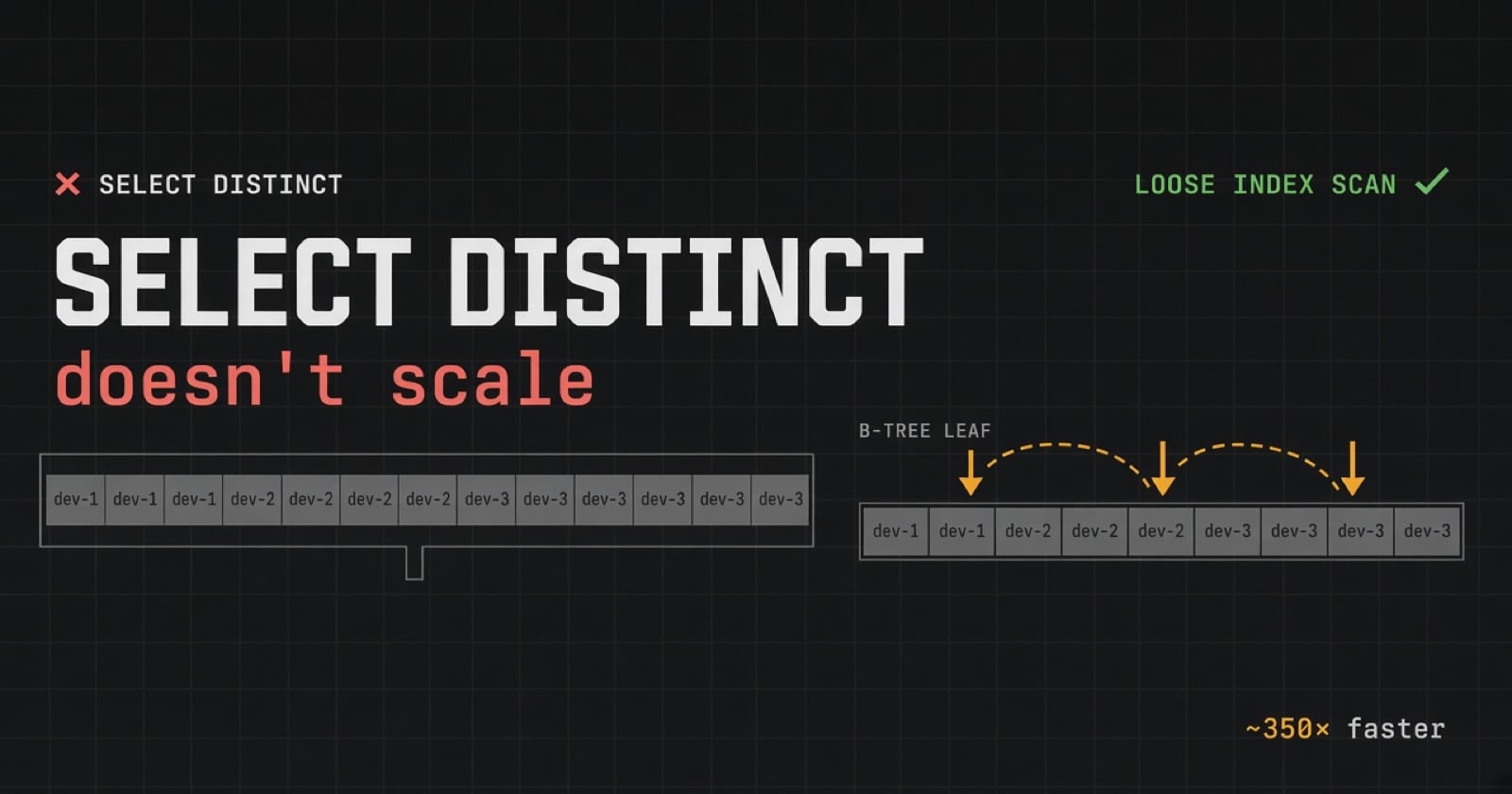
This query returns 4 rows. But internally, Postgres may be reading 10 million rows to produce them.
That's the problem. Let's understand why — and fix it.
2. How Postgres Indexes Work (B-tree Basics)
When you create an index on a column, Postgres builds a B-tree — a sorted tree structure.
CREATE INDEX ON tasks (status);
Think of the index like a physical phone book:
Root
 ├── Branch: "done" to "pending"
 │    ├── Leaf: done, done, done, done, done ...
 │    └── Leaf: failed, failed, failed ...
 └── Branch: "pending" to "running"
      ├── Leaf: pending, pending, pending ...
      └── Leaf: running, running, running ...
Key properties of a B-tree index:
Entries are sorted alphabetically (or numerically).
You can find any value with a fast tree descent — start at root, follow branches, land on the right leaf. This is called a seek.
Leaf nodes are linked — you can walk left-to-right through them in sorted order.
The index exists precisely so Postgres doesn't have to scan the whole table. But SELECT DISTINCT bypasses this advantage in a surprising way.
3. Why SELECT DISTINCT Is Secretly Slow
When you run:
SELECT DISTINCT status FROM tasks;
You might expect Postgres to:
Seek to the first
doneentry.Jump to the first entry that isn't
done→failed.Jump to the first entry that isn't
failed→pending.Jump to the first entry that isn't
pending→running.Done — 4 lookups.
But Postgres has no "jump" operation. There is no plan node called "skip past this group."
Instead, what the planner actually does:
Do an Index Only Scan — read every leaf entry in sorted order.
Feed all entries into a Unique node that keeps the first of each value and throws away the rest.
Index entries read:    10,000,000
Rows returned:                  4
Work wasted:           9,999,996 reads
The arrow below represents what Postgres actually does — sweeps across every leaf node:
Index leaf nodes (sorted):
[ done ][ done ][ done ]...[ failed ][ failed ]...[ pending ]...[ running ]...
 ──────────────────────────────────────────────────────────────────────────►
                        Postgres reads ALL of these
✗ Work grows with the number of rows, not the number of distinct values.
Why doesn't Postgres just skip?
MySQL has a feature called a "loose index scan" that does exactly this jump-skipping. Postgres historically didn't have it. (Postgres 18 is adding a "skip scan" for some limited cases, but it's not the full solution yet.)
So we build it ourselves.
4. The "Seek" — Your First Building Block
A seek is a single B-tree descent to find the first value greater than a given bound.
SELECT status FROM tasks
WHERE status > 'done'
ORDER BY status
LIMIT 1;
What happens internally:
Postgres descends the B-tree looking for the first entry where
status > 'done'.It lands directly on the first
failedleaf entry.LIMIT 1stops immediately.
Root
 └── Branch → "failed" range
      └── Leaf → [failed] ← lands here, reads 1 entry, stops
This is O(log n) — one tree descent, no scanning. It doesn't matter if there are 10 million rows; the seek always takes the same number of steps.
We can use this idea to find each distinct value one at a time. We just need a way to loop — and that's where recursive CTEs come in.
5. Recursive CTEs From Scratch
This is the most important section. Take your time here.
5.1 — What is a CTE?
A CTE (Common Table Expression) is just a named subquery that you define before your main query using the WITHkeyword. Its only job is to make queries easier to read by giving a name to something you'd otherwise nest.
-- Without CTE: nested and hard to read
SELECT * FROM (
  SELECT status FROM tasks ORDER BY status LIMIT 1
) sub;

-- With CTE: same exact query, just named
WITH first_status AS (
  SELECT status FROM tasks ORDER BY status LIMIT 1
)
SELECT * FROM first_status;
Both produce identical results. A CTE is purely a readability tool — until you make it recursive.
5.2 — What Does "Recursive" Mean Here?
In normal programming, recursion means a function calls itself. A recursive CTE is the SQL equivalent: a query that refers to its own results.
This turns a static query into a loop. Each iteration of the loop sees the output of the previous one, uses it, and produces new output. The loop keeps going until there's nothing left to produce.
The skeleton looks like this:
WITH RECURSIVE cte_name AS (

  -- PART 1: The ANCHOR
  -- Runs exactly once. Produces the starting rows.
  <starting query>

  UNION ALL

  -- PART 2: The RECURSIVE TERM
  -- Runs repeatedly. Each run sees only what the previous run produced.
  -- References cte_name to get those previous rows.
  <next step query that uses cte_name>

)
SELECT * FROM cte_name;
UNION ALL is the glue between the two parts. It means "combine the anchor results with all recursive results."
Why
UNION ALLand notUNION?UNIONremoves duplicates (extra work).UNION ALLkeeps everything. Since we're building a loop where we control the results ourselves, we useUNION ALLfor performance.
5.3 — Your First Recursive CTE: A Counter
Let's start with the simplest possible example — counting from 1 to 5 — before touching any real table.
WITH RECURSIVE counter AS (

  -- ANCHOR: start the sequence at 1
  SELECT 1 AS n

  UNION ALL

  -- RECURSIVE TERM: take whatever n was last, add 1 to it
  SELECT n + 1
  FROM counter          -- "counter" here means: the rows from the previous pass
  WHERE n < 5           -- stop condition: don't go past 5

)
SELECT n FROM counter;
Here is exactly what Postgres executes, pass by pass:
Pass 1 (anchor runs):
  Query:  SELECT 1 AS n
  Result: { n = 1 }
  Accumulated so far: [1]

Pass 2 (recursive term runs, sees pass 1's result):
  Query:  SELECT 1 + 1  (because n was 1)
  Result: { n = 2 }
  Accumulated so far: [1, 2]

Pass 3 (recursive term runs, sees pass 2's result):
  Query:  SELECT 2 + 1  (because n was 2)
  Result: { n = 3 }
  Accumulated so far: [1, 2, 3]

Pass 4 (recursive term runs, sees pass 3's result):
  Query:  SELECT 3 + 1
  Result: { n = 4 }
  Accumulated so far: [1, 2, 3, 4]

Pass 5 (recursive term runs, sees pass 4's result):
  Query:  SELECT 4 + 1
  Result: { n = 5 }
  Accumulated so far: [1, 2, 3, 4, 5]

Pass 6 (recursive term runs, sees pass 5's result):
  WHERE 5 < 5 → FALSE → produces zero rows → STOP

Final SELECT pulls all accumulated rows: 1, 2, 3, 4, 5
The critical rule to remember: each pass of the recursive term sees only the rows produced by the immediately previous pass — not all rows accumulated so far, not the anchor. Just the previous pass.
This is what makes it a controlled loop and not an infinite explosion.
5.4 — How the Stop Condition Works
The loop stops automatically when the recursive term produces zero rows. There are two common ways to trigger this:
Method A — Explicit bound in WHERE:
WHERE n < 5
-- When n reaches 5, the condition is false, zero rows produced → stop
Method B — Stop on NULL (used when you're querying a table):
WHERE t.value IS NOT NULL
-- When the subquery finds nothing, it returns NULL
-- NULL IS NOT NULL is false → zero rows produced → stop
We'll use Method B in the real fix because when we seek past the last status value, there's nothing left — the subquery returns NULL, and the loop stops.
⚠️ Always have a stop condition. If you forget it and the recursive term never produces zero rows, Postgres runs forever (or until it hits a configurable limit and errors out). The stop condition is not optional.
5.5 — A More Realistic Example: Walking a List
Let's do one more example before the real thing — walking through a list of cities, printing them one by one.
-- Pretend we have a small inline table of cities
WITH RECURSIVE walk AS (

  -- ANCHOR: start with 'Cairo'
  SELECT 'Cairo' AS city, 1 AS step

  UNION ALL

  -- RECURSIVE TERM: given the current city, what comes next?
  SELECT
    CASE walk.city
      WHEN 'Cairo'   THEN 'Riyadh'
      WHEN 'Riyadh'  THEN 'Dubai'
      WHEN 'Dubai'   THEN NULL       -- NULL signals "we're done"
    END,
    walk.step + 1
  FROM walk
  WHERE walk.city IS NOT NULL        -- stop when city becomes NULL

)
SELECT step, city FROM walk WHERE city IS NOT NULL;
Execution trace:
Pass 1 (anchor):    city = 'Cairo',  step = 1
Pass 2:             city = 'Riyadh', step = 2
Pass 3:             city = 'Dubai',  step = 3
Pass 4:             city = NULL,     step = 4  ← WHERE NULL IS NOT NULL → stop
Result:
step | city
-----|-------
  1  | Cairo
  2  | Riyadh
  3  | Dubai
Notice: the NULL row appears in walk's internal accumulation but is filtered out by the final WHERE city IS NOT NULL. This is the pattern we'll use.
5.6 — What Recursive CTEs Are Actually Used For
Recursive CTEs aren't just a curiosity — they solve a real class of problems that flat SQL can't handle without them. Here are the most common real-world use cases:
Use Case 1: Hierarchical / Tree Data
The classic example. You have an employees table where each employee has a manager_id pointing to another employee. You want all employees under a given manager, at any depth.
-- employees: id, name, manager_id
WITH RECURSIVE org_tree AS (

  -- ANCHOR: start with the CEO (no manager)
  SELECT id, name, manager_id, 1 AS depth
  FROM employees
  WHERE manager_id IS NULL

  UNION ALL

  -- RECURSIVE TERM: find everyone who reports to someone in the previous pass
  SELECT e.id, e.name, e.manager_id, org_tree.depth + 1
  FROM employees e
  JOIN org_tree ON e.manager_id = org_tree.id

)
SELECT depth, name FROM org_tree ORDER BY depth, name;
Without a recursive CTE, you'd need to know the depth in advance and write a fixed number of JOINs. With it, the tree can be arbitrarily deep.
Use Case 2: Pathfinding / Graph Traversal
You have a routes table: from_city, to_city, distance. You want all possible paths from Cairo to Dubai.
WITH RECURSIVE paths AS (

  -- ANCHOR: start at Cairo, no distance yet
  SELECT 'Cairo' AS current_city, 0 AS total_distance, ARRAY['Cairo'] AS visited

  UNION ALL

  -- RECURSIVE TERM: take one more step along any route
  SELECT r.to_city, paths.total_distance + r.distance, paths.visited || r.to_city
  FROM routes r
  JOIN paths ON r.from_city = paths.current_city
  WHERE NOT r.to_city = ANY(paths.visited)  -- don't revisit cities (avoid loops)

)
SELECT visited, total_distance
FROM paths
WHERE current_city = 'Dubai'
ORDER BY total_distance;
Use Case 3: Date/Number Series Generation
Generate a sequence of dates — for example, every day in September 2025 — without a helper table.
WITH RECURSIVE days AS (

  SELECT '2025-09-01'::date AS d

  UNION ALL

  SELECT d + 1
  FROM days
  WHERE d < '2025-09-30'

)
SELECT d FROM days;
This is handy for filling in gaps in time-series data (e.g., if some days have no sales, you still want a row for them showing 0).
Use Case 4: The Loose Index Scan (Our Problem)
Finding distinct values efficiently — which is exactly what we're about to solve. Each loop pass is one seek to the next distinct value.
5.7 — The Mental Model in One Picture
Normal query:           One shot. Produces results. Done.

Recursive CTE:          [Anchor] → result_1
                            ↓
                        [Recursive term sees result_1] → result_2
                            ↓
                        [Recursive term sees result_2] → result_3
                            ↓
                        [Recursive term sees result_3] → {} (empty) → STOP
                            ↓
                        Final query sees [result_1, result_2, result_3]
The anchor fires the starting gun. The recursive term is the loop body. The stop condition is the finish line. The final SELECT reads everything that accumulated.
6. Putting It Together: The Full Fix
Now we have both pieces:
The seek (Section 4): one fast B-tree descent to find the next distinct value.
The recursive CTE (Section 5): a loop that lets us repeat the seek for each value.
The goal: find each distinct status by jumping directly to it, never scanning between values.
WITH RECURSIVE t AS (

  -- ANCHOR: find the very first status value (alphabetically)
  (SELECT status FROM tasks ORDER BY status LIMIT 1)

  UNION ALL

  -- RECURSIVE TERM: find the next status after the one we just found
  SELECT (
    SELECT status
    FROM tasks
    WHERE status > t.status   -- seek past what we already have
    ORDER BY status
    LIMIT 1                   -- grab just the next distinct value
  )
  FROM t
  WHERE t.status IS NOT NULL  -- stop when the subquery returns NULL (no more values)

)
SELECT status FROM t WHERE status IS NOT NULL;
Annotated line by line
WITH RECURSIVE t AS (
Declare a recursive CTE named
t.
(SELECT status FROM tasks ORDER BY status LIMIT 1)
Anchor. Find the alphabetically first status in the table. One seek. Returns:
done.
UNION ALL
Combine anchor output with recursive term output.
  SELECT (
    SELECT status FROM tasks
    WHERE status > t.status   -- t.status is the value from the PREVIOUS pass
    ORDER BY status
    LIMIT 1
  )
Recursive term. For whatever status we found last pass, seek to the next one. The inner
SELECTis a correlated subquery — it runs once per row int(one row per pass).
FROM t WHERE t.status IS NOT NULL
Stop condition. When the inner seek finds nothing, it returns
NULL.NULL IS NOT NULLis false → zero rows → loop stops.
SELECT status FROM t WHERE status IS NOT NULL;
Final read. Pull all accumulated statuses, excluding the final
NULLsentinel.
Tracing through the execution
Assume the table has statuses: done, failed, pending, running.
Pass 1 (anchor):
  SELECT status FROM tasks ORDER BY status LIMIT 1
  → 'done'
  Accumulated: ['done']

Pass 2 (recursive term sees 'done'):
  SELECT status FROM tasks WHERE status > 'done' ORDER BY status LIMIT 1
  → 'failed'
  Accumulated: ['done', 'failed']

Pass 3 (recursive term sees 'failed'):
  SELECT status FROM tasks WHERE status > 'failed' ORDER BY status LIMIT 1
  → 'pending'
  Accumulated: ['done', 'failed', 'pending']

Pass 4 (recursive term sees 'pending'):
  SELECT status FROM tasks WHERE status > 'pending' ORDER BY status LIMIT 1
  → 'running'
  Accumulated: ['done', 'failed', 'pending', 'running']

Pass 5 (recursive term sees 'running'):
  SELECT status FROM tasks WHERE status > 'running' ORDER BY status LIMIT 1
  → NULL  (nothing greater than 'running' exists)
  WHERE NULL IS NOT NULL → FALSE → produces zero rows → STOP

Final SELECT: ['done', 'failed', 'pending', 'running']
Each pass does one B-tree descent. The index is used perfectly:
Index leaf nodes:
[ done ][ done ][ done ]...[ failed ][ failed ]...[ pending ]...[ running ]...
   ▲                           ▲                      ▲              ▲
 seek 1                      seek 2                 seek 3         seek 4
            (nothing scanned between seeks)
✓ Work grows with the number of distinct values, not the number of rows.
Performance comparison
| Approach | Rows touched (4 statuses, 10M rows) |
|---|---|
SELECT DISTINCT |
~10,000,000 |
| Recursive CTE | ~4 (one seek per distinct value) |
7. When Does This Actually Matter?
This optimization is specifically valuable when you have:
| Condition | Example |
|---|---|
| Few distinct values | 4 statuses, 10 device types, 50 categories |
| Many rows per value | Millions of tasks per status |
| A B-tree index on the column | Standard CREATE INDEX |
| A read-heavy workload | Dashboard queries, analytics, monitoring |
Real-world cases where this pattern helps:
Job queue systems —
SELECT DISTINCT status FROM jobsto build a status dropdown or filter UIKafka-style partitioned queues —
SELECT DISTINCT partition_id FROM messageswhere partitions are few but each has millions of rowsMulti-tenant systems — distinct tenant IDs from a huge events table
Enum-like columns — any column that acts like an enum but is stored as
TEXTorVARCHAR
When it's overkill:
The table has fewer than ~100k rows. Regular
SELECT DISTINCTis fast enough.The column has high cardinality — many distinct values, few rows per value (e.g., UUIDs, emails). The seek overhead adds up when there are thousands of distinct values to hop through.
You don't have an index on the column. Without an index, there's no B-tree to seek through.
8. Cheat Sheet
The basic pattern
WITH RECURSIVE t AS (

  -- Anchor: find the first value
  (SELECT col FROM your_table ORDER BY col LIMIT 1)

  UNION ALL

  -- Recursive term: seek to the next value each pass
  SELECT (
    SELECT col FROM your_table
    WHERE col > t.col
    ORDER BY col LIMIT 1
  )
  FROM t WHERE t.col IS NOT NULL   -- stop when nothing is left

)
SELECT col FROM t WHERE col IS NOT NULL;
Recursive CTE anatomy at a glance
WITH RECURSIVE name AS (
  ┌─────────────────────────────────┐
  │  ANCHOR                         │  ← runs once, produces starting rows
  └─────────────────────────────────┘
           UNION ALL
  ┌─────────────────────────────────┐
  │  RECURSIVE TERM                 │  ← loops, sees only previous pass rows
  │  FROM name WHERE <stop cond>    │  ← stop when this produces zero rows
  └─────────────────────────────────┘
)
SELECT * FROM name;                    ← reads all accumulated rows
Common stop conditions
-- When you know the upper bound:
WHERE n < 100

-- When you're querying a table and "nothing found" means done:
WHERE t.col IS NOT NULL

-- When you're traversing a graph and want to avoid cycles:
WHERE NOT node = ANY(visited_array)
Mental model: what changes each pass
Each pass of the recursive term sees:   previous pass output ONLY
Accumulated result grows with:          every pass's output combined
Final SELECT reads:                     all accumulated rows
The performance difference visualized
SELECT DISTINCT (naive):
  Index: [■■■■■■■■■■■■■■■■■■■■■■■■■■■■■■■■■■■■■■■■] ← reads ALL
  Result: [■][■][■][■]

Recursive CTE seek:
  Index: [■]          [■]          [■]     [■]      ← seeks only
  Result: [■][■][■][■]
TL;DR:
SELECT DISTINCTreads every row and filters after. A recursive CTE teaches Postgres to seek directly from one distinct value to the next — turning O(rows) work into O(distinct values) work. The recursive CTE is just a loop: anchor starts it, the recursive term advances it, a stop condition ends it.